Blog/Google Ads
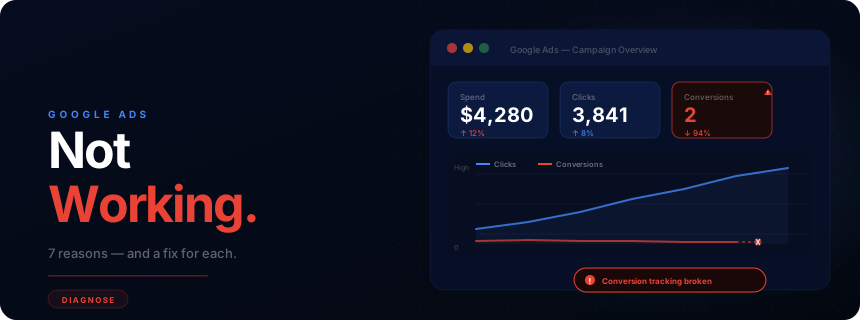
Why your Google Ads are not working — and how to fix them.
Seven structural problems kill most Google Ads accounts: wrong keyword match types, low Quality Scores inflating your CPC, landing page mismatch, bids too low to win auctions, broken conversion tracking, campaigns cannibalising each other's budget, and insufficient spend to exit Smart Bidding's learning phase. Every one has a specific fix — this guide covers all seven.

Ahmed Ashraf
Founder, Traffiy · April 2026 · Google Premier Partner
“Most Google Ads campaigns don't fail — they just never had a structure that could succeed. Fix the structure first. Budget second.”
— Ahmed Ashraf · $500M+ in budgets managed
Quality Score impact on what you pay
Google charges a CPC premium for low Quality Scores and gives a discount for high ones. Most accounts never audit this — and overpay every single click.
QS 1–4
+25–400%
CPC premium
QS 5–6
Baseline
Reference rate
QS 7–9
−15–25%
CPC discount
QS 10
−50%
CPC discount
Source: Google Ads Ad Rank & Quality Score documentation
Seven root causes
Why Google Ads underperform — and what to do about each.
20–40%
of ad budget is wasted in most Google Ads accounts on addressable issues — wrong keyword match types, poor negative keyword lists, and broken conversion tracking. Every one of these is fixable without increasing spend.
Wrong keyword match types
The problem
Broad match without a negative keyword list is the fastest way to burn budget. Your ads show for irrelevant queries — someone searching "free Google Ads tools" triggers your "Google Ads management" campaign.
The fix
Audit your Search Terms report weekly. Add irrelevant queries as negatives. For new accounts, start with phrase match and exact match on your highest-intent terms. Only use broad match when Smart Bidding has enough conversion data to guide it.
Low Quality Score
The problem
Quality Score (1–10) affects both your ad rank and what you pay per click. A score below 5 means you are paying a premium for lower positions. It is calculated from Expected CTR, Ad Relevance, and Landing Page Experience.
The fix
Create tightly themed ad groups — one topic, 10–20 keywords max. Write ad copy that includes the keyword naturally. Make sure the landing page continues the message from the ad. Each element should reinforce the same intent.
Landing page mismatch
The problem
The ad promises one thing; the landing page delivers another. Someone clicks a "Google Ads for eCommerce" ad and lands on your generic homepage. The visitor does not see what they came for and leaves immediately.
The fix
Every ad group should have a dedicated landing page (or at minimum, a page that directly addresses the ad's promise). Match the headline, the offer, and the CTA. Send eCommerce traffic to product or category pages — not your homepage.
Bids too low to win auctions
The problem
If your bids are consistently below the first-page bid estimate, your ads rarely show. You see low impressions and near-zero clicks. This is common when Target CPA is set too low before the algorithm has enough data.
The fix
Check the Auction Insights report. If your impression share is below 50%, bids are likely too low. For new campaigns, start with Maximise Conversions to gather data, then switch to Target CPA once you have 30+ conversions per month.
Conversion tracking is broken
The problem
This is more common than most advertisers realise. If Google's Smart Bidding has no conversion data, it cannot optimise toward your goal. You end up paying for clicks that no one in Google's system knows led anywhere.
The fix
Verify conversion tracking in Google Ads under Tools → Conversions. Each conversion action should show "Recording conversions". Test a real conversion yourself to confirm the tag fires correctly. Use Google Tag Assistant or GTM Preview mode.
Too many campaigns competing for the same keywords
The problem
Running three campaigns targeting the same keywords splits budget, raises internal competition, and confuses Smart Bidding. Google may show any of them — often the wrong one for the context.
The fix
Consolidate. One campaign per distinct goal (brand vs non-brand, prospecting vs remarketing). Use ad scheduling, device bid adjustments, and audience signals at campaign level rather than creating duplicate campaigns.
Not enough budget for the learning phase
The problem
Smart Bidding strategies need 30–50 conversions per month to work. If your daily budget only allows 10 clicks and your conversion rate is 3%, you will get fewer than 10 conversions a month — the algorithm stays in permanent learning.
The fix
Calculate the minimum viable budget: (target conversions/month × avg CPC). For a Target CPA campaign targeting 30 conversions at a £50 CPA, you need at least £1,500/month. Below that threshold, use Maximise Clicks first to gather volume.
Common mistake
Running Broad Match on a limited budget before you have 30+ conversions of data. Broad match needs data to work. Without it, it burns budget on irrelevant queries — “free Google Ads tools” triggering your “Google Ads management” campaign is a classic example.
Key insight
Conversion tracking is the foundation everything else is built on. If Google's Smart Bidding has no conversion data, it cannot optimise toward your goal. Before fixing keywords, bids, or ad copy — verify every conversion action in Tools → Conversions shows “Recording conversions” status.
| Issue | Where to find it | Fix |
|---|---|---|
| Broad match with no data | Keywords → Match type filter | Switch to phrase/exact until 30+ conversions |
| No negative keywords | Keywords → Search Terms | Add 50+ negatives from search terms report |
| Quality Score below 5 | Keywords → Add QS column | Tighten ad copy + landing page to keyword |
| Broken conversion tracking | Tools → Conversions | Test live with Google Tag Assistant |
| Target CPA on low volume | Campaign → Bidding | Switch to Maximise Conversions to gather data |
2–4 wks
Typical learning phase before Smart Bidding stabilises — do not make major changes during this window
30–50
Minimum monthly conversions needed for Target CPA to optimise effectively
7+
Quality Score threshold to start receiving CPC discounts vs competitors with lower scores
When to fix it yourself — and when to get help.
Check conversion tracking first
Go to Tools → Conversions. Every conversion action should show 'Recording' status with a recent last-conversion date. If any show 'Inactive' or no recent activity, this is your first fix — before changing any bids or keywords.
Pull the Search Terms report
Campaign → Keywords → Search Terms. Sort by cost descending. Anything spending more than your target CPA with zero conversions is wasted spend. Add it as a negative keyword immediately.
Check your Quality Score by keyword
Add QS as a column in your keyword view. Sort ascending. Any keyword below QS 5 is paying a CPC premium. Decide: improve it (better ad copy + landing page match) or pause it.
Fix it yourself when:
- ✓You have time to check Search Terms weekly
- ✓Your conversion tracking is working correctly
- ✓The account is new and just needs more data
- ✓You can write and test new ad copy each month
- ✓Budget is under $3K/month
Get help when:
- →You have tried fixing it and CPA keeps climbing
- →You are spending $5K+/month without a clear ROAS
- →Conversion tracking has never been properly set up
- →You are running campaigns on multiple channels at once
- →You need campaign results within weeks, not months
FAQ
Common questions about Google Ads performance.
Why are my Google Ads not getting any clicks?+
The most common reasons are low bids (your ads are not winning the auction), poor Quality Score (low expected CTR from the ad copy), or keywords with very low search volume. Check the Auction Insights report to see who you are losing to, and the Search Terms report to see what queries are actually triggering your ads.
Why are my Google Ads getting clicks but no conversions?+
Clicks without conversions usually point to a landing page problem — the page does not match the ad's promise, loads too slowly, or lacks a clear conversion path. It can also mean the keywords attract the wrong intent: informational queries reaching a page built for buyers. Audit the landing page against each ad group's intent.
How long does it take for Google Ads to start working?+
2–4 weeks to exit the learning phase. Smart Bidding strategies (Target CPA, Target ROAS) need at least 30–50 conversions per month to optimise effectively. During that window, CPAs will be higher and results will fluctuate. Do not make major changes until the campaign has enough data.
What is a good Quality Score for Google Ads?+
Quality Score is rated 1–10. A score of 7 or above is considered good; 10 is achievable for branded terms. Scores below 5 mean your ads pay more per click and rank lower than competitors. Improve Quality Score by tightening the match between keyword, ad copy, and landing page — all three need to speak the same language.
Should I use broad match, phrase match, or exact match in Google Ads?+
For most accounts, start with phrase match and exact match for your highest-value keywords. Broad match can work when paired with Smart Bidding and strong negative keyword lists, but it is the most common source of wasted spend in new accounts. Add negatives weekly for the first month.
Ahmed Ashraf — Founder, Traffiy
10+ years in paid media. $500M+ in budgets managed across Meta, Google, and TikTok. Google Premier Partner — top 3% globally. Every article on this blog is written from direct experience managing real campaigns.
Want us to audit your Google Ads account?
Traffiy manages Google Ads directly — no handoffs, no junior account managers. Free strategy call to review what is not working.